matt ryall’s weblog

Popular among those in the know since 2002.

Site

Portrait of Matt Ryall


About me

Feed icon Articles feed

Feed icon Comments feed

Archive

Photography

Europe trip 2004

More photos

Software

NoteWiki

Other Pages

About Me

Uni timetable

SysProg Journal

The List

jQuery filter demo

11 July 2008

The other night I spent a few hours hacking together an upload file control for this site. As part of that work, I decided to build a little file viewer which let me see all the images I had uploaded so far.

It turned out to be a pretty neat example of jQuery and a CSS grid layout, so I split out the filtering into a new demo: Filter demo.
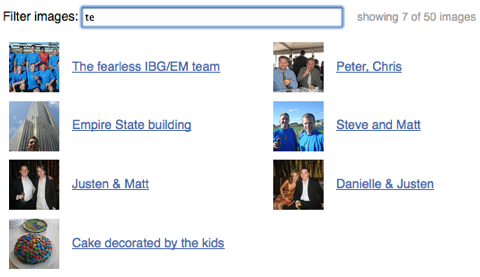
Filter demo screenshot

You just type a few keystrokes and some JavaScript goes through the list of pictures and selects the ones with titles that match what you typed. Surprisingly, the JavaScript for this with jQuery is very simple:

$("#filter").keyup(function () {
    var filter = $(this).val(), count = 0;
    $(".filtered:first li").each(function () {
        if ($(this).text().search(new RegExp(filter, "i")) < 0) {
            $(this).addClass("hidden");
        } else {
            $(this).removeClass("hidden");
            count++;
        }
    });
    $("#filter-count").text(count);
});

It uses an input field with an ID of ‘filter’, a list contained in an element with class ‘filtered’, and uses the text inside each list item for filtering. The element with an ID of ‘filter-count’ has its value set to the number of elements remaining after the filter is applied.

This should be generic enough that it’s possible to apply it to many different situations. You could also modify the matching line to use the Quicksilver scoring algorithm.

The layout is completely CSS based, and should scale up and down and reflow nicely in browsers with decent CSS support. It took me quite a while to get that right, and I had to add one non-meaningful element to the markup to fix the width of each image-caption pair.

 
Posted by SC at 2008-08-06 05:26:58
Is it possible to have keywords for people to click on to filter instead of having people enter in text?
 
Posted by Jay at 2008-08-08 00:10:09
what back-end are you using to pull this information from? I am wondering if you could do this functionality with and html or xml dataset similar to how spry’s filtering works.
 
Posted by Matt Ryall at 2008-08-11 20:15:45
@SC: Yes, this should be fairly straightforward. Instead of using an ID in your jQuery selector like ‘#filter’, you should use a class name on your keyword elements (<span> or whatever) and attach a click event handler instead. Your filter value would be the text of each keyword element — $(this).text() instead of $(this).val().

Have a look at the jQuery demos on http://docs.jquery.com if you need some more examples to understand how this would work.

@Jay: the JS uses this URL on my site, which randomly picks some photos from my Flickr account:

http://www.mattryall.net/flickr-photos.cgi?count=50

It could just as easily be any URL which returns XML, HTML or JSON.

An AJAX callback passed to the jQuery.get() function which receives XML or HTML will be called with an object representing the data, exactly like the jQuery.getJSON() function that I use. Have a play around with the demos in the jQuery documentation to see how this works:

http://docs.jquery.com/Ajax

 
Posted by patrick at 2008-09-11 20:40:22
please how can I APPLY A PHOTOCOPY FILTER TO ALL IMAGES COMING TO THE SCREEN ,
IMAGES AND FLASH MOVIES
THANK YOU
I MEAN APPLYING ANY FILTER TO ALL IMAGES . THE SAME ONE TO ALL IMAGES AND VIDEO
 
Posted by Darbas namie at 2008-09-29 21:36:41
Nice job, Matt! Your version is very nice as it’s so easy to implement and working really well. I’m already using it - http://www.loger.lt/loger/tags/.

Thank you very much!
 
Posted by Matt Ryall at 2008-09-30 07:06:25
Very nice work, Darbas. I like your tags layout!
 

Comments on this article have been closed.