Part of my strongly worded advice to all web developers was that you absolutely should not be using tables for page layouts in web pages in 2008. This is great advice, but unless you know how to use the alternative technologies, it’s pretty hard to follow.
To do my bit to hurry along the decline of table-based layouts, I prepared a presentation for my colleagues on the fundamentals of CSS layouts. It covered the building blocks of CSS in some detail, as well as some examples of how you can use these to construct common page layouts.
I’ve decided to publish the presentation to my blog as a series on CSS layout fundamentals. This is the first part in the series.
The box model
The foundation of CSS layouts is the box model. Everything in CSS is a rectangular box.
Going from the outside, each box has (optionally):
- margins that separate it from other boxes
- borders that can be different colours and styles (or images in CSS 3)
- padding that separates its border from its content
- content.
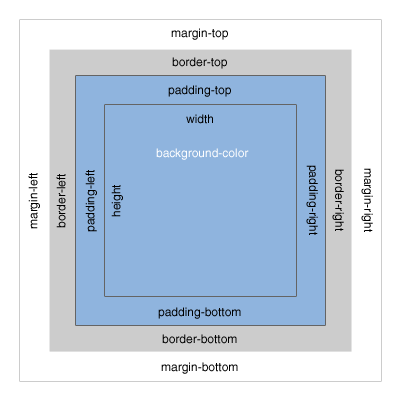
Box model diagram (Rich Hauck)
When people start using CSS, they often assume margins and padding are synonymous. The main difference you quickly discover is that padding inherits the background colour but margin doesn’t. This is because padding is conceptually “inside” the element, providing padding for its content, while margins are conceptually “outside” the element.
Every box in the CSS model has padding, margin and borders. Unless they are defined – by you or your browser – the size of each defaults to zero. In addition to the size of the internal content and any scrollbars, they add together to make up the width and height of the box.
The one unusual behaviour of these boxes in CSS is that the vertical margins between boxes collapse. That is, if you have a box with a ten-pixel bottom margin and a second below it with a ten-pixel top margin, you will only have ten pixels between the boxes because the margins collapse to the greater value of the two margins. Horizontal margins do not collapse.
In some circumstances, the padding and/or margins are ignored for the purposes of CSS layouts. We’ll cover this soon.
The next part in the series will be about the CSS visual formatting model.